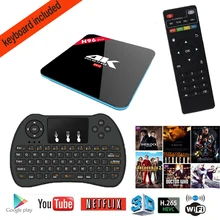











H96 Pro plus 3GB/16GB Amlogic S912 Octa core Android 6.0 TV box UHD BT4.1 Streaming Media Player with Mini keyboard I8
 |
45 days Money back Returns accepted if product not as described, buyer pays return shipping; or keep the product & agree refund with seller. |
|---|---|
 |
On-time Delivery Guarantees: On-time Delivery 60 days |
Most Popular from Category
[ Mini Wireless Touch Keyboard] Amlogic S912 Octa Core Android 6.0 3G 16GB UHD 3D Streaming Media Player Kodi Pre-installed Dual WiFi 2.4G/5G Bluetooth set-top box

· Android 6.0 Marshmallow,the most professional and newest operating system of Android box.It can be powerfully compatible with plenty of applications.The OTA updating is available to you· H96 pro+ is the newest version with Amlogic S912 Octa-core 64-bit ARM CortexTM-A53 up to 2GHz, plus 750MHz+ ARM Mali-820MP3 GPU processor
· Amlogic S912 octa core, the latest most Powerful Octa Core CPU performance for Network Set-top Box. Full Octa core Cortex-A53 bits, up to 2.0GHZ Ultra high frequency, more than 4 times performance improvements. Pairing with ARM Mali-T820MP3 GPU up to 750MHz, such high configuration gives you AWESOME home theater and gaming experiences
· KODI 16.1 is pre-loaded, the latest version of kodi(XBMC).Say goodbye to the old Kodi.It is also being pre-loaded with more addons for you,the majority of free video,film,music,TV show,TV live etc are available to you. Also support 2.4G/5G Dual WIFI Band and bluetooth
· 2GB DDR3,16GB EMMC Flash, improving the processing speed rapidly. Also Support Micro SD(TF) Up to 64GB. You can also see the specifical storage of each software obviously · Built-in HDMI 2.0a transmitter including both controller and PHY with HDR, CEC and HDCP 2,2, 4Kx2K@60 max resolution output
· 4K 60fps display, 4K x 2K H.265 hardware video decode and 4K x 2K output with 10/100/1000Mbps cable network, offering you high definition picture and fluently video playing. It’s compatible better with your HD 4K home TV


Android OS: Android 6.0 OS
CPU: Amlogic S912 Octa core ARM Cortex-A53 CPU up to 2GHz
GPU: ARM Mail-T820MP3
RAM: 3GB DDR3
Memory size: 16GB EMMC Flash (8-32GB optional)
Storage extension: Support MicroSD(TF) ,Up to 32GB
Wifi: 2.4GHZ/5.8GHZ 802.11a/b/g/n /ac

HDMI: HDMI 2.0 up to 4K2K@60FPS
Video Output : Built-in HDMI 2.0a transmitter including both controller and PHY with HDR, CEC and HDCP 2,2, 4Kx2K@60 max resolution output
Image browser:Support JPG、JPEG、BMP、GIF、PNG、JFIF…etc photo format
Software extension: Support Google Play & APK install
Protocol: Support DLNA,Miracast Protocol,Support DRM requirement
Remote Control:Support Smart phone remote control、2.4GHZ wireless air mouse/Remote controller
IM Software: Support Skype/QQ/MSN/GTALK (Depends on APK install)
Office Software:WORD/EXCEL/PDF(Depends on APK install)


1, Network TV set-top boxes in the use of time, we must ensure that your home has been connected to the Internet through broadband, which means that you have to ensure that your home has been installed broadband.
2, When connected to Internet TV set-top boxes, connect the AV video interface, and the corresponding interface can get standard TV programs but not to watch high-definition television programs, some old TV HDMI interface, so it can only use the AV interface to connect the tv. HDMI interface and the TV is relatively should be able to watch more high-definition television programs, this interface is the best way to connect the network TV set-top box. RJ45 network interface is connected to broadband network, the general family network is configured with a router to achieve the share of the signal, so the installation of the time only need to connect the interface and the router is good. If there is a WIFI antenna on the set-top box, then you can make a wireless connection, if you use the router at home is also a wireless router, then you can not use the RJ45 network interface to connect it
3, The set-top box connected to the TV, HDMI TV interface, you can directly use the HDIM connection to connect, it is connected to HDIM terminal on the TV, the other end to be connected in the network set-top box.
4, If there is no wireless WIFI, then in the use of the need to connect the network cable in the set-top box, the other end of the cable to connect to the router.
5, After the TV set top box is connected, turn the television on, set the network parameters, so you can normally use the set-top box to watch the TV program.

Here are a few different places you can get add-ons, called repositories. One repository, called official repository, comes built-in to KODI,so you can get right to browsing the addons catalog without any extra work.
There are a few third-party add-ons which is unofficial that you won’t find in KODI by default. You can find some on this wiki page http://kodi.wiki/view/Unofficial_Add- on_Repositories ,but you’ll find others on the KODI forums.

1. Intalling add-ons from official KODI repository
a) Open up KODI and head to System> Add-Ons> Get Add-Ons> click “KODI.org Add-Ons” > KODI wil present a number of categories
b) Choose one add-on from these categories> hit the “Install” button to install the add-on.
c) To access it, go to its category(e.g., if you installed a “Video Add-on”, you’d head back to the main menu and go to Video> Vedio Add-Ons).
2. Installing addons from unofficial KODI repository
a) To install them, you’ll need to add their repositories. Download its zip file to your local storage.
b) Open up KODI and head to System> Add-Ons> click “Install from zip file” .
c) Navigate to the zip file on your local storage> select “OK” to Install. In the bottom right, notifies when the add-on is installed and enabled.
d) Head to “Get add-ons”> choose the repository you just installed> browse add-ons from it just like you did the official repository.
0 out of 5 (0 Ratings)
| Positive (0%) |
5 Stars (0)
|
|
4 Stars (0)
|
|
| Neutral (0%) |
3 Stars (0)
|
| Neutral (0%) |
2 Stars (0)
|
|
1 Star (0)
|
| Name | Rating | Feedback |
|---|
| Shipping Company | Shipping Cost | Estimated Delivery Time |
|---|---|---|
 |
3 - 7 days | |
 |
3 - 7 days | |
 |
5 - 14 days | |
| Post Air Mail | Free Shipping | 15 - 45 days |
| Return Policy | If the product you receive is not as described or low quality, the seller promises that you may return it before order completion (when you click "Confirm Order Received" or exceed confirmation timeframe) and receive a full refund. The return shipping fee will be paid by you. Or, you can choose to keep the product and agree the refund amount directly with the seller. N.B.: If the seller provides the "Longer Protection" service on this product, you may ask for refund up to 15 days after order completion. |
|---|---|
| Seller Service | On-time DeliveryIf you do not receive your purchase within 60 days, you can ask for a full refund before order completion (when you click "Confirm Order Received" or exceed confirmation timeframe). |
Most Popular from Category

New SmartPhone Cell Cradle Holder SMART GEAR Car Mount for PMP Phone Camera

New personality design computer speakers Portable Wireless Super Bass Stereo Bluetooth Speaker for SmartPhone Tablet PC
US $13.26 / piece
Portable Metal Wireless Bluetooth Speaker TF Card FM Music Player Subwoofer Speaker with Microphone Handfree Phone UM
US $18.22 / piece

LK-B12 smartphone Universal Support 3.0 Bluetooth headset for Samsung Galaxy Core Advance I8580 Free Shipping
US $21.18 / piece

Universal Smartphones Wireless Stereo Bluetooth silver mirror Handsfree Headset for Lenovo A388T A788T S660 Free Shipping
US $23.50 / piece

AHASTYLE TA1 Ear Hook For Airpods Accessories Silicone Ear Cover For Air Pods Earpods Case For Airpods Accessories For Air Pods
US $29.98 / piece
online shopping, buying directly from manufacturers?
- Go to Alibaba.com and enter the wanted item into search field.
- Having made your choice, click "Contact supplier" button on the right
- On the next page enter your request and click "Send" button.
- Upon clicking you will be asked to get registered. Do it and wait for the reply.
 ▼
▼